Sponsored By


Efika 5200B Project
 Developer and Multimediatools for MorphOS
in category Multimedia
proposed by geit on 26th October 2006 (accepted on 6th December 2006)
Project Summary
A general overview on the software I am developing can be found here: http://www.geit.deMy current main project is Valiant Vision a complex multimedia video driver system.
A significant target would be to bring this stuff to Efika and support tv card/graphic board combinations. Detailed information om the project and its goals can be found here.
There you can also find a valiant gallery and a progress log.
Other hardware drivers like my infrared driver system \"IRCom\" are also in development and fitting perfect into the \"Valiant Vision\" project and a simple ircom driver for the irda port of the Efika would open even more possiblities without the need of external hardware.
Guido Mersmann
Link summery:
Main Page : http://www.geit.de
ValiantVision : http://www.geit.de/eng_valiantvision.html
IRCom : http://www.geit.de/eng_ircom.html
IRTrans : http://www.geit.de/eng_irtrans.html
Project Blog Entries

During the last weeks I fixed several small bugs and glitches.
The most important feature that will be included in the next beta release is a
new multimedia display API (MMD).
This API along with a matching skin, will turn the MediaCenter into an
interactive platform, where the driver decides what to display and how.
This can be a jukebox, that only plays a track when getting a signal from coin
slot. Also a product information display like you can find in many shops, where
you can search and browse though the products to get additional information and
alternate products.
Its design leaves the where and what up to the MMD driver. So data can be stored
locally on disk, changeable on card or obtained via network. This allows to
flexible update all information stands at once without changing local media or
update data on each system.
Since the MMD driver is only the interface between database and MediaCenter it
can even be used as a shop itself. Imagine an Efika based information stand or
television set that allows you to order products right away.
Of course this will take some time to implement and there is much more on to do
list. Stay tuned while waiting for updated pictures.
Geit
Recently I implemented the audio player class API and the first two player
classes to see if it's working.
I wrote a mpega playback class and a wrapper class for modules available for
the well known AminetRadio. So until there is no native or MediaCenter specific
class it's possible to use those 30+ format players to play music with the MediaCenter.
Beside that I implemented full keyboard control (previous versions were
thouchscreen/mouse only). Keyboard control includes remote control support which
was lost when converting the old center into a MUI application.
The music player functions were enhanced and thanks to PegaYenzi I replaced the
old sucky images by real nice versions. Some images are still missing as you can
see the standby button in top left looks like a stop button. Stuff like shuffle
and repeat will be next on the list.
If you think this screen looks a little overloaded, then you're right.
For testing it's easier to have the stuff in visual range. It can be changed by
anyone with a simple text editor. Same for the buttons and the background. The
entire design is flexible and can be modified by the user as you can see on the
pictures below.
There is also a player screen planed, which can be activated on demand.
Geit
As promised here the missing pictures. First the new MUI4 version of the MediaCenter.
Now an example to show how flexible the stuff is. This is the same program with just a different skin. Well my skills in making graphics are very limited, so ...
Here a picture of the new preferences tool. It allows to configure the entire MediaCenter. Here the page with setup for skin, infra red and cache drawer.
Geit
It took several month, but now it's time to update.
I rewrote most parts of the MediaCenter. The most time intensive change was the
graphical stuff. It's now using MUI4 and you won't see any difference, beside
the fact that it's more flexible this way, even when you don't see the standard
MU-interface. A nice side effect is that now the mediacenter supports touch
screen, mouse and remote control.
Well even that is untrue! Beside the graphical mode there is a GUI mode which
uses the normal MUI4 look. It's configurable like any other MUI application.
This version will allow more than just playing music, videos or displaying
pictures. It will allow to handle the entire database. For example you mp3
collection can be modified by using this tool. It will allow to edit mp3 tags in
several ways. The basement a specific system library is already written and will
be expanded to fit the needs.
No new screen shot yet, as I need to clean up the GUI and remove debug and test
configurations which mess up the screen and make the stuff look ugly. New
picture will follow soon.
Geit
Worked a lot on the graphic engine and modified it to my needs.
Added flexible clipping to allow objects to scroll and fly in contained areas. Also worked on the database to be more flexible and save resources.
Added Image caching and improved image management. In the result it got really fast due less datatype usage.
The number of elements shown inside a display is now up to the skin and the display mode. If the skin support only 3 x 3 (image shows 4x4) covers thats fine and the media center will adapt. Remember you can change anything!
Sorry no picture this time. It looks exactly like the last image, just changed stuff in the background. After implementing the next parts I am able to make many shots which also should demonstrate the features provided by the flexible skin stuff.
Geit
I added a new preview gadget type and reworked the entire engine to be more useful and fit my upcoming needs.
Cursor operation is also possible by remote control and the new cursor handling functions are working perfect.
Sorry (again) for the german texts, but be sure the stuff is (as always) multilingual and I simply forgot to switch to defaults.
Geit
PS: I know that "1/2 Seiten" is wrong! That is already fixed! ;)
Having an Efika with a remote controlled mp3 player GUI is working, but not what you want to see on your television.
So I decided two days ago to build my own MediaCenter. I started with ripping
the graphic engine from my still unfinished game. After a few hours of
modifications I have a proper working graphical GUI where all elements can be
animated and float around the screen and the best thing is, that everything can
be changed and shaped like hell.
I added a few loader for accessing my CD collection and painted a few panels to
have something to work with. Hopefully someone will make a better replacement
for this in the near future.
Image loader and scaler are in place. I thing it looks quite nice for the first try.
Sorry for the german texts, but be sure the stuff is (as always) multilingual and I simply forgot to switch to defaults.
Geit
During the last months I worked on several other projects which partly will be used on Efika as well.
But I also invested much time in setting up a proper working Efika installation using MorphOS.
Now, thanks to the new sound drivers I am able to use my Efika for more than ordinary server operations.
Currently the Efika has SVN and FTP server installed and running to support my development. Now I was finally able to test my IRCom driver set for the first time on Efika. I turned my Efika into a mp3 and audio streaming client.
I installed available software packets and configured IRCom to allow to control those applications by remote control. Beside a small missing feature I need to add in the near future it works great.
Here some pictures, were you can see my efika running in his native environment.
Who cares about standard hardware anymore. Efika rockz! As it's so cool, there is no reason to hide the case inside a hifi-rack.
Isn't that an stylisch audio player?
This little thingy turns into an surf station, too.
It's also a file and source code server and can be used as a mobile NAS drive. The internal power supply makes it quite mobile without carrying loads of cables and a separate power block around. Just plug power and network.
As you can see I need to find a white remote control. The black remote is from the CD-player inside the rack which wasn't turned on for a long time. So I use the remote to control my Efika now.
Here is a picture of the ircom driver set and some of the configuration windows. You can see the remote editor which allows to learn IR-keys, give them names and use these keys from inside applications.
Since there are not many applications supporting IRCom (most of them sending ir data) yet, several tools are included to work around this issue. So you can create DOS scripts which are triggered by ir signals or you can use the first available ircom application named IRComRemote. It's main goal is that it's converting any IR-signal into any action. This may ordinary key stroke, or a series of key strokes. It's also possible to move, resize and close windows, move screens, run rexx scripts, run dos scripts, run applications and use a quite large number of internal macros to fit your needs.
Here you can see MPlayer playing a video, while AmiNetRadio resides in the back and waits for mp3 or streaming action.
And of course gaming is still possible. :)
The good old BoulderDash made it to Efika, too!
Geit
First step was to build a propper case for Efika.
Well, it wasn't really a part of my project, but having hardware on the edge of destruction because of a missing case isn't my way.
So with much help I got a very cool and unique case in MorphOS look: My Efika Case
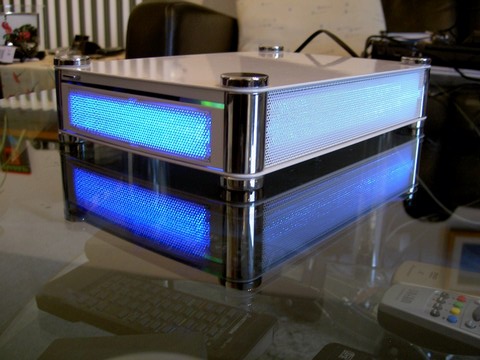
It took several weeks to get the stuff perfect as you can see here.
Geit.de - Efikase page
Geit
Yeah, baby!
Today my favorite vendor called me that my licence to spy is available for 11 Euro.
Well, I couldn't resist and here it is! My personal IR-Card which allows to convert IR-signals into visible light.
So I can finaly see what my Efika is sending via IRDA. Well, what it may send when I start first hardware tests.
Geit