All times are UTC-06:00


Post new topic  Reply to topic  [ 26 posts ] 
Author Message
 Post subject:
PostPosted: Fri Mar 25, 2011 2:19 am 
Offline

Joined: Mon Jan 08, 2007 3:40 am
Posts: 195
Location: Pinto, Madrid, Spain
Quote:
Natty will have a unified image for both and you pick your desktop, or the Classic GNOME desktop.
Aha. I'd love being able to install only the things I want. Not only for taking out those abusing OpenGL screensavers... Would that be possible? I mean, the stock Efika MX coming with a very light distribution on board, and then let the user add as much bloat as desired.

If that could be done on different memory cards, that would allow having six different computers in your pocket. Variants of the operating system should go in external media, while user's documents should be internal... Or in Ubuntu's cloud.

My, computers have changed a bit in these years...

Meanwhile, I'd say that the next two milestones for the current operating systems should be the new video codec drivers, and that desktop with hardware acceleration someone else is making.


Top
   
 Post subject:
PostPosted: Fri Mar 25, 2011 4:38 pm 
Offline
Site Admin

Joined: Fri Sep 24, 2004 1:39 am
Posts: 1594
Location: Austin, TX
Quote:
Quote:
Natty will have a unified image for both and you pick your desktop, or the Classic GNOME desktop.
Aha. I'd love being able to install only the things I want. Not only for taking out those abusing OpenGL screensavers... Would that be possible?
No. Here's why:
Quote:
neko@buildbot:~$ sudo apt-get remove xscreensaver-gl
[sudo] password for neko:
Reading package lists... Done
Building dependency tree
Reading state information... Done
The following packages will be REMOVED:
ubuntu-desktop xscreensaver-gl
0 upgraded, 0 newly installed, 2 to remove and 4 not upgraded.
After this operation, 1,180kB disk space will be freed.
Do you want to continue [Y/n]?

_________________
Matt Sealey


Top
   
PostPosted: Sat Mar 26, 2011 5:32 am 
Offline

Joined: Wed Jul 27, 2005 9:20 am
Posts: 242
Just saying "Hi!" from my new Smarttop, currently sitting besides my 42" TV in my living room! :-)


Top
   
PostPosted: Sat Mar 26, 2011 8:28 am 
Offline

Joined: Tue Mar 31, 2009 10:24 pm
Posts: 171
Quote:
Just saying "Hi!" from my new Smarttop, currently sitting besides my 42" TV in my living room! :-)
Damn, you beat me by 16" :D

On the plus side, mine sits on my work desk, where I can make sweet loving to those pixels ; )


Top
   
 Post subject:
PostPosted: Sat Mar 26, 2011 9:50 am 
Offline

Joined: Wed Mar 16, 2011 4:15 pm
Posts: 20
Quote:
Quote:
Quote:
Natty will have a unified image for both and you pick your desktop, or the Classic GNOME desktop.
Aha. I'd love being able to install only the things I want. Not only for taking out those abusing OpenGL screensavers... Would that be possible?
No. Here's why:
Quote:
neko@buildbot:~$ sudo apt-get remove xscreensaver-gl
[sudo] password for neko:
Reading package lists... Done
Building dependency tree
Reading state information... Done
The following packages will be REMOVED:
ubuntu-desktop xscreensaver-gl
0 upgraded, 0 newly installed, 2 to remove and 4 not upgraded.
After this operation, 1,180kB disk space will be freed.
Do you want to continue [Y/n]?
While I agree that bundling ubuntu-desktop is the best choice (what most Ubuntu users would expect), I don't see how the removal of the meta-package is relevant to the discussion.


Top
   
 Post subject:
PostPosted: Sat Mar 26, 2011 4:35 pm 
Offline
Site Admin

Joined: Fri Sep 24, 2004 1:39 am
Posts: 1594
Location: Austin, TX
Quote:
While I agree that bundling ubuntu-desktop is the best choice (what most Ubuntu users would expect), I don't see how the removal of the meta-package is relevant to the discussion.
Removing ubuntu-desktop removes a substantial chunk of dependency information from the packaging system. As an example, if ubuntu-desktop is updated to recommend a certain package which replaces another on your system, which then other parts tend to rely on or work better, you will miss out on that complex update.

It also means "apt-get dist-upgrade" will eventually fail, and really, you'd expect it to work.

We simply cannot ship it without "ubuntu-desktop", all recommendation all the way back to Debian upstream says don't remove the virtual package for the desktop as it may cause spooky actions.

You may remove the package *any time you like* but we won't ship it that way.

For Natty I'm going to regenerate the metapackages (genesi-blah instead of ubuntu-blah) because things like xscreensaver-gl get in the way and the whole Unity vs. GNOME thing is annoying. Unfortunately we can't remove Mesa or GLX either, too many things are compiled against them.

Go complain at Ubuntu for shipping this stuff by default on ARM, at the same time go remind them that s3 virge, rendition, sun graphics etc. are pointless on armv7 (check the dependencies of xorg-xserver-video metapackage).

_________________
Matt Sealey


Top
   
 Post subject:
PostPosted: Mon Jun 13, 2011 6:13 am 
Offline

Joined: Wed Jul 27, 2005 9:20 am
Posts: 242
Someone over at amiga.org asked about the "Part 2" of my little review. Well, I was planning to shoot some videos to show the thing in action, but since they have announced that an upgrade to the software will come soon (which AFAIK will improve speed and bring HW acceleration), I thought I'd better wait until that is released. It seems it is a little overdue, but I'm sure it'll get here eventually! :)

In the meantime, here are some photos of the Efika Smarttop (let's call this "Part 1.5" ;)):

The Efika MX Smarttop is a cloud computer with the following specifications:

Freescale i.MX515 (ARM Cortex-A8 800MHz)
3D Graphics Processing Unit
WXGA display support (HDMI)
Multi-format HD video decoder and D1 video encoder (currently not supported by the included software)
512MB RAM
8GB Internal SSD
10/100Mbit/s Ethernet
802.11 b/g/n WiFi
SDHC card reader
2x USB 2.0 ports
Audio jacks for headset
Built-in speaker

Size: 160x115x20mm
Weight: 250 grams

Not one single moving part! No fan, no HDD, no *nothing* that creates noise! :)

The Efika MX Smarttop comes in a much smaller box than the Smartbook...
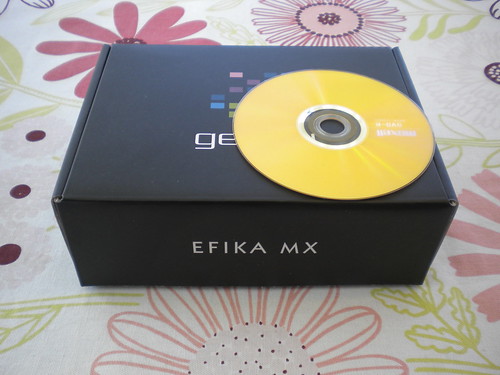
Image

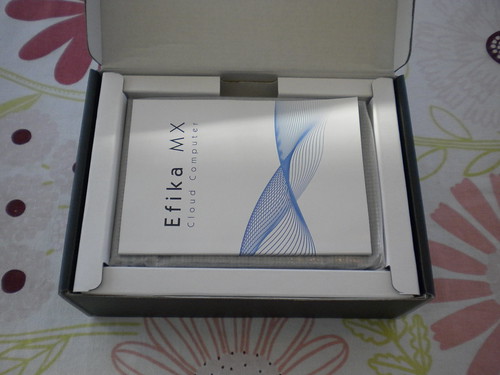
...but everything is carefully packaged and well protected inside the box. The Smarttop computer itself (you can see it underneath the user manual) is wrapped in some plastics to protect the nice surface from scratches:
Image

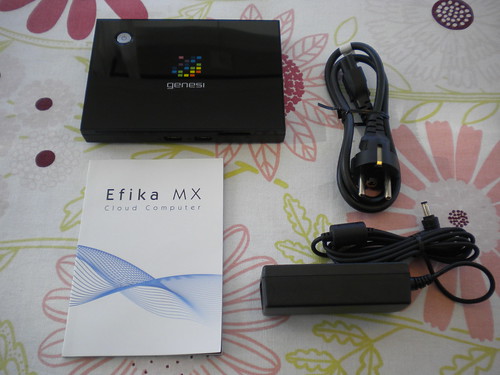
And here is what you get in the box; One Efika MX Smarttop computer, one user manual, one transformer with a power cord:
Image

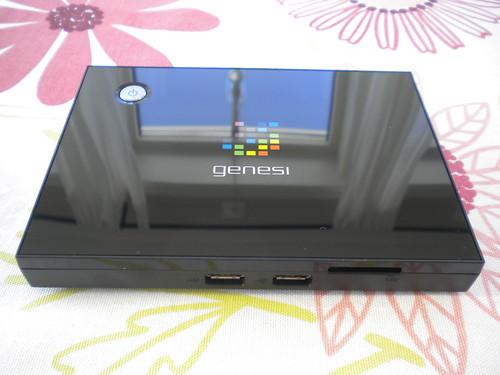
On the front side of the Smarttop, you will find the following, 2x USB 2.0, and one SD memory card slot:
Image

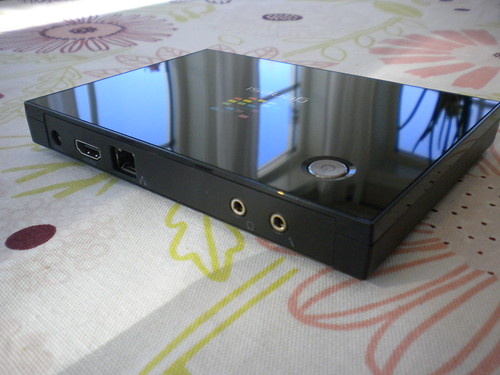
The Backside of the Smarttop has the following connectors (from left to right): Power, HDMI, 100Mbit Ethernet, Audio Out, and Audio In:
Image

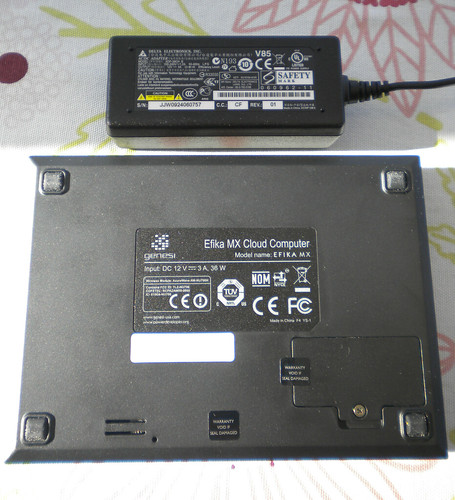
The Smarttop has all the relevant Safety Markings:
Image

And for reference I have placed a standard DVD disk on top of it. Look *how small* the thing really is! :-)
Image

Hardware wise, the Smarttop is very similar to the Smartbook. The Smarttop obviously doesn't have a built-in screen and no batteries. It also lacks Bluetooth compared to the Smartbook. It has a 8GB SSD instead of the Smartbook's 16GB. But it *does* have an Ethernet connector as well as HDMI (both lacking in the Smarttop). Other than that, it's built on exactly the same ARM SoC, so it has the same performance and the same HW accelerators.

The delivered OS is also the same; Ubuntu "Maverick". I quickly connected it to my living-room TV and fired it up. The OS then runs the set-up procedure (just like on the Smartbook) which sets the system up in the way you like (create user account, localization settings, language, keyboard, time zone, etc). My WiFi was quickly recognized and Internet was up and running before the set-up procedure had even begun. :)

The screen resolution is set to 1920x1080 (1080p HD). This is very nice on a monitor at your desk top I guess, but the default font sizes etc made the text a little difficult to read when sitting in a sofa and using this on a TV. I think I might want to change the resolution to 720p instead, and this resolution is also what the on-chip video decoding accelerator can manage according to the specs (lets see when the SW support for this is released).

It would have been nice to have Bluetooth built in as well for easy transfer of data from your mobile phone, as well as using nice wireless keyboards like "Logitech diNovo Edge", which would sit perfectly besides my sofa ;).

But all in all - this is an extremely nice little machine, *totally* worth its price! :)


Top
   
 Post subject:
PostPosted: Sat Jun 18, 2011 9:59 am 
Offline

Joined: Sat Jun 18, 2011 1:41 am
Posts: 2
Location: New Jersey
my first impression is "how in the world are they able to offer such a complete device at a price that is cheaper than the cost of the parts?". Kudos to Genesi for offering such a deal, Im simply amazed. This has been a great introduction to embedded technology and linux suitable for both PowerDevelopers and novices like me. Its great having a well supported and stable platform as my jumping off point. I hope to use this to develope for the cortex-m3 for my artwork once I get a better understanding of this vodoo called a tool chain!
kind regards
michaeltristan


Top
   
 Post subject:
PostPosted: Sun Jun 19, 2011 12:33 pm 
Offline

Joined: Mon Mar 26, 2007 2:21 pm
Posts: 34
Location: Germany
Hi,

i am really interested in the smarttop. As far as i remember i suggested to go ARM during the EFIKA portable times (PPC) : D

I have a few questions:

1. Is there a way to use the HD encoder/decoder?
I know that the included Unbuntu can't do it, but is it possible to use another system like Android (don't know if Android supports the chip)?

2. Why is there no built in WIfi?
No problem (USB), but i would really like to pay 30+ just to have an clean little black box.

3. Is quake 3 playable? ; )
If possible i would like to see a benchmark.

4. AROS hosted is working, but is there also a native build? With sound, Ethernet?

5. Ubuntu ARM related:
Is there Flash support? 9 or 10 ?

Best Regards


Top
   
 Post subject:
PostPosted: Sun Jun 19, 2011 9:48 pm 
Offline

Joined: Sun Mar 27, 2011 1:18 pm
Posts: 183
Location: Hornell, NY
I have a smart book and a smart top and they both have wifi built in.


Top
   
 Post subject:
PostPosted: Mon Jun 20, 2011 7:40 am 
Offline

Joined: Mon Mar 26, 2007 2:21 pm
Posts: 34
Location: Germany
Thanks!
Yep i have found the right description now.

Is there a Quake 3 benchmark available?
Well i will buy one.

_________________
www.ares-shop.de


Top
   
Display posts from previous:  Sort by  
Post new topic  Reply to topic  [ 26 posts ] 

All times are UTC-06:00


Who is online

Users browsing this forum: No registered users and 0 guests


You cannot post new topics in this forum
You cannot reply to topics in this forum
You cannot edit your posts in this forum
You cannot delete your posts in this forum

Search for:
Jump to:  
PowerDeveloper.org: Copyright © 2004-2012, Genesi USA, Inc. The Power Architecture and Power.org wordmarks and the Power and Power.org logos and related marks are trademarks and service marks licensed by Power.org.
All other names and trademarks used are property of their respective owners. Privacy Policy
Powered by phpBB® Forum Software © phpBB Group